Your server. Simpler to manage.
Rent a server for your game, your business apps or your next idea. Tell our AI agent what you want in plain words, and it sets it up for you.
From $2.99/moDDoS protection included · Cancel anytime, prorated refund
Set up a Minecraft server for 20 friends
docker run -d itzg/minecraft-serverufw allow 25565/tcp
Done. Your friends can join at play.your-server.gg
What you get
- Ready in under a minute
- < 60 s
- SSD storage on every plan (NVMe)
- Fast
- Attacks blocked before they reach you
- Protected
- Full control, like your own computer
- Yours
- Starting price per month
- $2.99
One platform for the work that matters
What are you building?
Websites & business
Keep your website and business online.
Run your website, store and team apps on servers you control. GGProtect WAF sits in front of every hostname with managed rules, bot challenges and rate limits at layer 7, Scalebit absorbs layer 3/4 DDoS floods on the network, and Shield, our firewall, applies your own rules. Certificates are issued automatically.
● HTTPS shop.example.com → certificate issued automatically
- BlockedSQLi/login?id=1' OR 1=1203.0.113.24
- BlockedTraversal/../../etc/passwd203.0.113.5
- AllowedPOST/api/orders192.0.2.14
- Limited429/api/cart198.51.100.66
- Websites & commerceYour business, open to the world
- Business applicationsThe tools your people use
- Client servicesThe work your customers rely on
An example of the request path and event feed, not a live account.



One provider, every workload
Start with a budget VM, choose general-purpose resources for business apps, or use dedicated cores for gaming. Compare tiers to find the right fit.
Available with every plan
AI agent
Manage your server through a conversation.
Describe what you need through Telegram or the dashboard. The Evorxa AI agent installs apps, edits settings and troubleshoots issues by running commands on your server and reporting the results.
It looks first
Logs, disk, services, config. The agent reads the actual state of your server before it proposes anything.
It makes the change
Packages, firewall rules, restarts, patches: real commands on your server, not a snippet for you to paste.
It shows its work
Commands and their output appear in the conversation, so you can see what changed and why.
Tailored to your team
Easy to use for one server or a whole fleet: same dashboard, same API.
Deploy queue
Eygelshoven, NLFits into your existing workflows
Provision from the dashboard or manage servers from your scripts through the API. Choose your OS and resources, and use the AI agent for help with setup and operations.
- Dashboard
- REST API
- AI agent
- Telegram
One panel for every server you run
Shared cores for websites and everyday workloads, or dedicated high-frequency cores for more demanding tasks. Manage both from one dashboard.
- Shared cores
- Dedicated cores
- 1Start with one serverPick a plan and an OS in the dashboard. It boots in under a minute.
- 2Automate the routineScript it with the API, or ask the AI agent to install and configure software.
- 3Grow into a fleetAdd servers as you need them and manage them all from the same panel.
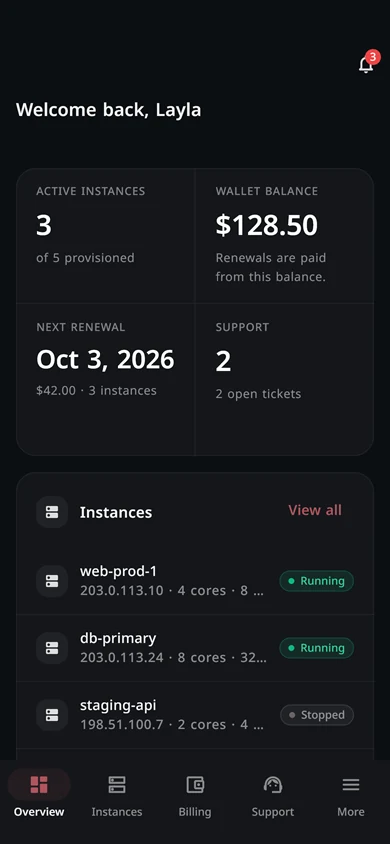
Evorxa for Android
Your cloud, in your pocket.
The Evorxa app is now on Google Play. Deploy, monitor and manage your servers from anywhere, with the same account you use on the web.
- 5 languages
- Dark mode
- Push alerts
Shield
Stop attacks before they reach your server.
Shield sits on the network in front of every server. It drops floods at the edge and lets your real users through. Add your own rules by country, network or IP in two clicks.
- Layer 3–7Layer 3 to 7: network floods and web attacks
- Every planIncluded on every plan, no setup needed
- 2 clicksTo block a country or network
- Allow listBlock list by default, allow list when you need it
How an attack looks
Attack dropped. Players never noticed.
- Incoming
- 32.4 Gbps
- Dropped
- 31.0 Gbps
- Delivered
- 1.4 Gbps
Internet: Players, customers and attack floods arrive together
Shield edge: Floods are dropped on our network, before your uplink
Your server: Only clean traffic arrives. Nothing to configure
Shield on our network so far
- Attacks mitigated
- 310
- Largest attack absorbed
- 374 Gbps
- Median time to mitigate
- 97 s
- Bad requests blocked in the last 30 days
- 37.3M
Attack types seen on our network
- UDP Flood34%
- SYN Flood16%
- ACK Flood14%
- FIN Flood8%
- RST Flood8%
- Handshake6%
The performance you need, the control you want
NVMe storage, DDoS protection and the freedom to configure your server for games, business apps or your next project.


DDoS protection
Shield protects your server from DDoS attacks on the network. Set access rules by country, network or IP address from the dashboard.
NVMe storage
NVMe storage in every tier for your apps, databases and game files. Choose the capacity your project needs.
Start with the setup you need
Choose a plan and operating system from the dashboard, follow provisioning progress and start setting up your apps.
Full root access
Configure your Linux server and install your software with full root access. Use the AI agent for help or manage the server yourself.
Pricing
Clear plans. Choose what you need.
Compare resources and choose a plan for your game server, business apps or next project. Switch billing cycles to see prepaid discounts.
All plans13 plans
Every plan in all three families. · from $2.99 /mo
Budget VMs3 plans
Shared cores and NVMe at a lower starting price. · from $2.99 /mo
Standard VMs5 plans
General-purpose VMs with unmetered bandwidth. · from $11.99 /mo
High-Frequency VMs5 plans
Dedicated high-frequency Ryzen cores. The best choice for game servers like FiveM and Minecraft. · from $39.99 /mo
Billed monthly. Pay yearly to save up to 20%Paid every 6 months. You save 10%Paid once a year. You save 20%
Nano
A small website or a bot
$2.99 /mo$2.99$2.69 /mo$16.15 billed every 6 months$2.99$2.39 /mo$28.70 billed every 12 months- vCPU1 core
- Memory2 GB
- NVMe30 GB
- Uplink500 Mbps
- Most popular
Micro
A small game or a personal project
$4.99 /mo$4.99$4.49 /mo$26.95 billed every 6 months$4.99$3.99 /mo$47.90 billed every 12 months- vCPU2 cores
- Memory4 GB
- NVMe40 GB
- Uplink500 Mbps
Mini
A game for friends or a small shop
$5.99 /mo$5.99$5.39 /mo$32.35 billed every 6 months$5.99$4.79 /mo$57.50 billed every 12 months- vCPU3 cores
- Memory6 GB
- NVMe50 GB
- Uplink500 Mbps
- Most popular
Tiny
A business app or a store
$11.99 /mo$11.99$10.79 /mo$64.75 billed every 6 months$11.99$9.59 /mo$115.10 billed every 12 months- vCPU4 cores
- Memory8 GB
- NVMe100 GB
- Uplink1 Gbps
Large
Several apps for a team
$14.99 /mo$14.99$13.49 /mo$80.95 billed every 6 months$14.99$11.99 /mo$143.90 billed every 12 months- vCPU4 cores
- Memory10 GB
- NVMe150 GB
- Uplink1 Gbps
XLarge
Busy sites and databases
$22.99 /mo$22.99$20.69 /mo$124.15 billed every 6 months$22.99$18.39 /mo$220.70 billed every 12 months- vCPU6 cores
- Memory16 GB
- NVMe200 GB
- Uplink2 Gbps
2XLarge
A growing company stack
$29.99 /mo$29.99$26.99 /mo$161.95 billed every 6 months$29.99$23.99 /mo$287.90 billed every 12 months- vCPU8 cores
- Memory20 GB
- NVMe300 GB
- Uplink2 Gbps
3XLarge
Heavy workloads and CI
$44.99 /mo$44.99$40.49 /mo$242.95 billed every 6 months$44.99$35.99 /mo$431.90 billed every 12 months- vCPU10 cores
- Memory32 GB
- NVMe400 GB
- Uplink2 Gbps
Recommended for game servers. Dedicated high-frequency Ryzen cores for FiveM, Minecraft and other game servers.
Silver
A busy game community
$39.99 /mo$39.99$35.99 /mo$215.95 billed every 6 months$39.99$31.99 /mo$383.90 billed every 12 months- vCPU4 cores
- Memory16 GB
- NVMe200 GB
- Uplink2.5 Gbps
- Most popular
Gold
Large game servers and modded worlds
$59.99 /mo$59.99$53.99 /mo$323.95 billed every 6 months$59.99$47.99 /mo$575.90 billed every 12 months- vCPU6 cores
- Memory24 GB
- NVMe300 GB
- Uplink2.5 Gbps
Platinum
Big communities and heavy mods
$79.99 /mo$79.99$71.99 /mo$431.95 billed every 6 months$79.99$63.99 /mo$767.90 billed every 12 months- vCPU8 cores
- Memory32 GB
- NVMe400 GB
- Uplink2.5 Gbps
Diamond
Several game servers on one machine
$119.99 /mo$119.99$107.99 /mo$647.95 billed every 6 months$119.99$95.99 /mo$1,151.90 billed every 12 months- vCPU10 cores
- Memory48 GB
- NVMe600 GB
- Uplink2.5 Gbps
Emerald
The heaviest game and compute loads
$159.99 /mo$159.99$143.99 /mo$863.95 billed every 6 months$159.99$127.99 /mo$1,535.90 billed every 12 months- vCPU12 cores
- Memory64 GB
- NVMe800 GB
- Uplink2.5 Gbps
- Cancel anytime, prorated refund.
- Shield DDoS protection included
- Full root access
- AI agent usage billed separately
Why teams choose Evorxa
Less time fixing servers. More time building.
What usually goes wrong, and what you get here instead.
Elsewhere
- A traffic flood takes your server offline
- Pages and games lag at peak time
- You wait hours for a support reply
- The renewal price is much higher than the first bill
- A bandwidth cap stops you mid-month
- A surprise invoice at the end of the month
With Evorxa
- Shield drops floods on the network, before they reach you
- NVMe disks and dedicated Ryzen cores on High-Frequency plans
- The AI agent checks your server and fixes it with you, right away
- The price you see is the price you pay at renewal
- Unmetered bandwidth on Standard plans
- Prepaid billing. You always know what you pay
Why teams choose Evorxa
Everything needed to run fast, protected servers, without babysitting them.
Status: unresolved
Finding the cause and the next step takes time.
Ask the AI agent
It reads the logs, finds the cause and runs the fix on your server.
High latency
DDoS attacks take your attention away from players and customers.
Shield on every plan
Floods are dropped on the network, before they reach your server.
Renewal terms need a careful review.
Published prices
Renewal uses the plan price you see. Pay monthly, every 6 months or yearly.
Bandwidth cap reached
Check the allowance and costs before choosing a plan.
Unmetered traffic
No bandwidth cap from the Standard tier up.
Resources do not fit the workload
Your app may need dedicated cores rather than shared ones.
Dedicated cores
High-Frequency Ryzen tiers for game servers and busy apps.
Migration request open
The steps and settings need a review.
Free migration
One command copies your old server here, files and settings included.
Shipping with Evorxa
- AI server management, billed by usage
- Shield protection included with every plan
- Clear prices and billing cycles
- Websites and storefronts
- Apps and APIs
- Game and voice servers
- Automation and workers
Compare
What changes when you switch.
The short version. The full side-by-side with named providers is on the compare page.
Typical cheap VPS
- Intro price, then it renews higher
- Pay 24 months up front for the best rate
- DDoS protection is an add-on or basic
Evorxa
- The price you see is the price you renew at
- Pay monthly, every 6 months or yearly
- Shield DDoS protection on every plan
FAQ
Questions people ask before they sign up.
Billing, control, protection and hardware, answered plainly. If something is missing, the docs go deeper.
Read the docsWhat is Evorxa?
Evorxa is a VPS and VDS host where an AI agent runs the server for you. You describe what you need in plain language from Telegram or the dashboard, and the agent runs the commands, reads the output, and reports back. Plans start at $2.99 a month on NVMe storage.
How is Evorxa billed?
Prepaid, per billing cycle: monthly, six months or yearly, with the longer cycles discounted. The price shown for a cycle is what you pay up front, and the regular price applies again at renewal. Launch promotions, when running, discount the first payment only and are labelled as such.
Do I still get SSH and root access?
Yes. Every plan includes full root access to a normal Linux machine. The AI agent is an addition, not a replacement — you can ignore it entirely and administer the server the way you always have.
Is DDoS protection included?
Yes, on every plan at no extra cost. A 3 Tbps anycast scrub tier drops L3, L4 and L7 floods before they reach your uplink, and country and ASN rules apply at the edge.
Can I host game servers on Evorxa?
Yes. The high-frequency VDS tier uses dedicated Ryzen cores and is the right fit for game servers including FiveM, Minecraft, Rust, CS2, Garry's Mod and Squad, which benefit from single-thread performance and always-on DDoS filtering. You can also pick Pterodactyl from the one-click apps at checkout and get a game panel on the same server.
How fast is a server ready?
Usually within a few minutes from order to a booted machine you can log into.
What is the difference between VPS and VDS here?
VPS plans share CPU cores between tenants and are the economical choice for websites, workers and general workloads. VDS plans give you dedicated high-frequency cores that nobody else can contend for, which matters for game servers, databases and anything latency-sensitive.
Where are the servers located?
Evorxa currently operates one region, in Eygelshoven in the Netherlands, with low-latency routes across Europe and the Gulf. More regions are planned.
What operating systems can I run?
Any mainstream Linux distribution, Ubuntu 24.04 included. You have full root, so you can install and tune whatever the workload needs.
Is there an API?
Yes. The public API is the same one the dashboard uses, so anything you can do by clicking you can do from a script, a CI pipeline, or Terraform.
Your next server is a minute away.
Pick a plan, deploy in under a minute and let the AI agent handle the setup. Cancel anytime with a prorated refund.