VPS hosting with an AI agent and DDoS protection. Your server. Simpler to manage.
Evorxa is a VPS and VDS hosting provider operated by ScaleBit Technologies, L.L.C. Tell our AI agent what you want in plain words, from Telegram or the dashboard, and it sets it up for you. DDoS protection is included on every plan.
From $2.99/moDDoS protection included · Cancel anytime, unused days credited to your wallet
What you get
- Ready in about a minute
- ~1 min
- SSD storage on every plan (NVMe)
- Fast
- Attacks blocked before they reach you
- Protected
- Full control, like your own computer
- Yours
- Starting price per month
- $2.99
One provider, every workload
Start with a budget VM, choose general-purpose resources for business apps, or use dedicated cores for gaming. Compare tiers to find the right fit.
- Budget VMsShared cores and NVMe storage at a lower starting price.from$2.99/mo
- Standard VMsGeneral-purpose VMs with unmetered bandwidth.from$11.99/mo
- High-Frequency VMsDedicated high-frequency Ryzen cores.from$39.99/mo
- DDoS protectionProtection features and mitigation figures
- Game serversDedicated cores for game and voice servers
- One-click appsn8n, Nextcloud, Pterodactyl, cPanel and more
Why teams choose Evorxa
Less time fixing servers. More time building.
What usually goes wrong, and what you get here instead.
Shield drops floods on the network, before they reach you
Elsewhere:
A traffic flood takes your server offlineRenews at the regular listed price. Sale discounts apply to the first term only and are labelled
Elsewhere:
The renewal price is much higher than the first billThe AI agent checks your server and fixes it with you, right away
Elsewhere:
You wait hours for a support replyUnmetered bandwidth on every plan
Elsewhere:
A bandwidth cap stops you mid-monthPrepaid billing. You always know what you pay
Elsewhere:
A surprise invoice at the end of the monthNVMe disks and dedicated Ryzen cores on High-Frequency plans
Elsewhere:
Pages and apps slow down at peak time
Pricing
Clear plans. Choose what you need.
Compare resources and choose a plan for your business apps, website or next project. Switch billing cycles to see prepaid discounts.
General-purpose VMs with unmetered bandwidth.
- vCPU
- 4 cores
- Memory
- 8 GB
- NVMe
- 100 GB
- Port
- 1 Gbps
- Eygelshoven, NL
Your server
Tiny · Standard VMs
A business app or a store
- vCPU4 cores
- Memory8 GB
- NVMe100 GB
- Port1 Gbps
12 left
- Cancel anytime. Unused days are credited to your wallet balance.
- Shield DDoS protection included
- Full root access
- AI agent usage billed separately
Compare all plans
| Plan | vCPU | Memory | NVMe | Uplink | Price / mo | Order |
|---|---|---|---|---|---|---|
| Nano | 1 core | 2 GB | 30 GB | 500 Mbps | $2.99 | |
| Micro | 2 cores | 4 GB | 40 GB | 500 Mbps | $4.99 | |
| Mini | 3 cores | 6 GB | 50 GB | 500 Mbps | $5.99 |
Move your server to Evorxa
- Pick a plan and choose Migrate a server
- Paste one command on your old server
- The whole disk copies across: files, users and settings
- The same server, now running on Evorxa
AI agent
Manage your server through a conversation.
Describe what you need through Telegram or the dashboard. The Evorxa AI agent installs apps, edits settings and troubleshoots issues by running commands on your server and reporting the results.
It looks first
Logs, disk, services, config. The agent reads the actual state of your server before it proposes anything.
It makes the change
Packages, firewall rules, restarts, patches: real commands on your server, not a snippet for you to paste.
It shows its work
Commands and their output appear in the conversation, so you can see what changed and why.


One platform for the work that matters
What are you building?
Websites & business
Keep your website and business online.
Run your website, store and team apps on servers you control. Shield covers every hostname: its WAF applies managed rules, bot challenges and rate limits at layer 7, layer 3/4 DDoS floods are absorbed on the network, and its firewall applies your own rules. Certificates are issued automatically.
● HTTPS shop.example.com → certificate issued automatically
- BlockedSQLi/login?id=1' OR 1=1203.0.113.24
- BlockedTraversal/../../etc/passwd203.0.113.5
- AllowedPOST/api/orders192.0.2.14
- Limited429/api/cart198.51.100.66
- Websites & commerceYour business, open to the world
- Business applicationsThe tools your people use
- Client servicesThe work your customers rely on
An example of the request path and event feed, not a live account.


Shield
Stop attacks before they reach your server.
Shield sits on the network in front of every server. It drops floods at the edge and lets your real users through. Add your own rules by country, network or IP in two clicks.
How an attack looks
Attack dropped. Your users never noticed.
- Incoming
- 32.4 Gbps
- Dropped
- 31.0 Gbps
- Delivered
- 1.4 Gbps
- Layer 3–7
Shield edge
Floods are dropped on our network, before your uplink
- 2 clicks
To block a country or network
Block list by default, allow list when you need it
- Every plan
Your server
Only clean traffic arrives. Nothing to configure
Shield on our network so far
- Attacks mitigated
- 413
- Largest attack absorbed
- 374 Gbps
- Median time to mitigate
- 96 s
- Bad requests blocked in the last 30 days
- 7.8M
Attack types seen on our network, as a share of all vectors (one attack can combine several)
- UDP Flood27%
- SYN Flood18%
- ACK Flood15%
- RST Flood10%
- FIN Flood9%
- Handshake8%
WAF and CDN
Our WAF in front. Our CDN in 34 edge locations.
Your servers run in one region, Eygelshoven in the Netherlands. Requests to your sites pass our WAF before they reach your server, and our CDN delivers your sites from 34 edge locations.
- CDN edge locations
- 34
- WAF for web requests
- Layer 7
The performance you need, the control you want
NVMe storage, DDoS protection and the freedom to configure your server for business apps, websites and databases.
DDoS protection
Shield protects your server from DDoS attacks on the network. Set access rules by country, network or IP address from the dashboard.
NVMe storage
NVMe storage in every tier for your apps, databases and files. Choose the capacity your project needs.
Start with the setup you need
Choose a plan and operating system from the dashboard, follow provisioning progress and start setting up your apps.
Full root access
Configure your Linux or Windows server and install your software with full root or Administrator access. Use the AI agent for help or manage the server yourself.
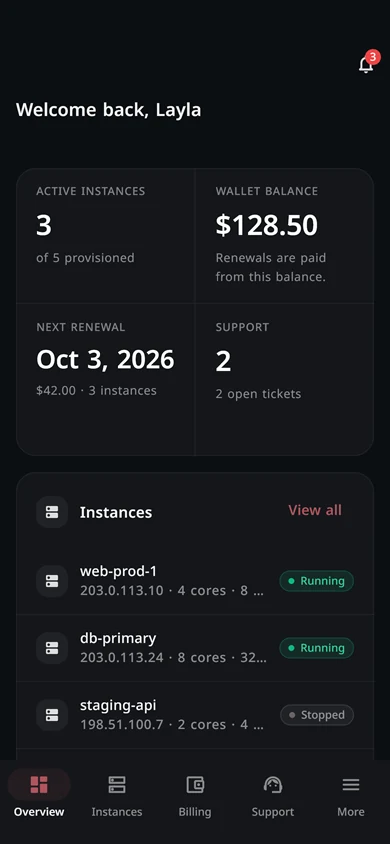
Evorxa for Android
Your cloud, in your pocket.
The Evorxa app is now on Google Play. Deploy, monitor and manage your servers from anywhere, with the same account you use on the web.
- 5 languages
- Dark mode
- Push alerts
FAQ
Questions people ask before they sign up.
Billing, control, protection and hardware, answered plainly. If something is missing, the docs go deeper.
Read the docsWhat is Evorxa?
Evorxa is a VPS and VDS hosting provider operated by ScaleBit Technologies, L.L.C., where an AI agent runs the server for you. You describe what you need in plain language from Telegram or the dashboard, and the agent runs the commands, reads the output, and reports back. Plans start at $2.99 a month on NVMe storage.
How is Evorxa billed?
Prepaid, per billing cycle: monthly, every six months or yearly, with the longer cycles discounted. A server renews at the regular listed price; sale discounts apply to the first term only and are labelled.
Do I still get SSH and root access?
Yes. Every plan includes full root access over SSH, or Administrator access on the Windows Server template. The AI agent is an addition, not a replacement: you can ignore it entirely and administer the server the way you always have.
Is DDoS protection included?
Yes, on every plan at no extra cost. A 3 Tbps anycast scrub tier drops L3, L4 and L7 floods before they reach your uplink, and country and ASN rules apply at the edge.
Can I host game servers on Evorxa?
Yes. The high-frequency VDS tier uses dedicated Ryzen cores and is the right fit for game servers including FiveM, Minecraft, Rust, CS2, Garry's Mod and Squad, which benefit from single-thread performance and always-on DDoS filtering. You can also pick Pterodactyl from the one-click apps at checkout and get a game panel on the same server.
How fast is a server ready?
A server with a plain OS image is usually ready to log into about a minute after you order it. A one-click app takes a few more minutes to install on top.
What is the difference between VPS and VDS here?
VPS plans share CPU cores between tenants and are the economical choice for websites, workers and general workloads. VDS plans give you dedicated high-frequency cores that nobody else can contend for, which matters for game servers, databases and anything latency-sensitive.
Where are the servers located?
Evorxa has one server region today, in Eygelshoven in the Netherlands, with low-latency routes across Europe and the Gulf. The Shield CDN and WAF edge has more points of presence, and more server regions are planned.
What operating systems can I run?
Linux images, including Ubuntu, Debian and other distributions, and a Windows Server template. You have full root (Administrator on Windows), so you can install and tune whatever the workload needs.
Is there an API?
Yes. The public API is the same one the dashboard uses, so anything you can do by clicking you can do from a script, a CI pipeline, or Terraform.
Your next server is a minute away.
Pick a plan, have the server ready in about a minute and let the AI agent handle the setup. Cancel anytime and the unused days are credited to your wallet balance.